Tuesday, October 23, 2018

[Java] Central Authentication Service (CAS) Authentication

To secure the application, only authenticated user should be able to access it. Authorize user can be located in database or LDAP repository. Most of the time the users already have user repository like Active Directory. Providing a solution that can be configured to use different repository would be a good idea. It will decouple the authentication provider with the user repository. Below diagram shows an option for CAS to connect to database.

The diagram below shows an application deployed in application server, e.g. Websphere or JBoss authenticate logon user against LDAP or database.


Below is a sample code to call CAS server to authenticate user.


import java.io.IOException;
import java.io.UnsupportedEncodingException;
import java.net.HttpURLConnection;
import java.net.MalformedURLException;
import java.net.URL;
import java.net.URLEncoder;
import java.util.LinkedHashMap;
import java.util.Map;
import javax.security.sasl.AuthenticationException;


public class CasAuthenticationAdapter{

  private static final String CAS_URL = "http://{hostname}:{port}/cas-server-webapp-3.5.2/v1/tickets";

public boolean authenticate(
  String username, 
  String password){

  String tgt = null;

try{
tgt = getTicketGrantingTicket(username, password);
}catch (IOException e){
e.printStackTrace();
}

if (tgt == null){
return false;
}else{
return true;
}
}


private  String getTicketGrantingTicket(
  String username, 
  String password)throws IOException{

Map<String,Object> params = new LinkedHashMap<>();
params.put("username", username);
params.put("password", password);
HttpURLConnection conn = post(CAS_URL, params);

  if(conn.getResponseCode() == 400){
    throw new AuthenticationException("bad username or password");
  }
        
  String location = conn.getHeaderField("Location");
  System.out.println("TGT LOCATION -> " + location);
  return location;
}


private HttpURLConnection post(
  String url, 
  Map<String, Object> params)throws IOException{
System.out.println("Posting to url '" + url +"' w/ params '" +   params.toString() + "'");

URL connectionUrl = createUrl(url);
byte[] postDataBytes = convertParamMapToBytes(params);
HttpURLConnection conn = (HttpURLConnection)connectionUrl.openConnection();
        conn.setRequestMethod("POST");
        conn.setRequestProperty("Content-Type", "application/x-www-form-urlencoded");
        conn.setRequestProperty("Content-Length", String.valueOf(postDataBytes.length));
        conn.setDoOutput(true);
        conn.getOutputStream().write(postDataBytes);
        return conn;
}


private URL createUrl(String url) throws MalformedURLException{
return new URL(url);
}


private byte[] convertParamMapToBytes(
  Map<String, 
  Object> params)throws UnsupportedEncodingException{
StringBuilder postData = new StringBuilder();
    for (Map.Entry<String,Object> param : params.entrySet()){
      if (postData.length() != 0) postData.append('&');
      postData.append(URLEncoder.encode(param.getKey(), "UTF-8"));
      postData.append('=');         postData.append(URLEncoder.encode(String.valueOf(param.getValue()), "UTF-8"));
        }
      return postData.toString().getBytes("UTF-8");
}

}

Wednesday, October 17, 2018

Logstash read from database table

Sometimes logs are save to database during runtime; and most of the time there are data that can be used to get status of the transaction saved in the table. Below is the sample Logtash database connection configuration that connects to IBMi DB2 for i.


input
{

jdbc{
jdbc_connection_string => "jdbc:as400://{HOSTNAME}"
jdbc_user => "{DB_USERNAME}"
jdbc_password => "{DB_PASSWORD}"
jdbc_driver_library => "/JT400DIR/jt400-6.7.jar"
jdbc_driver_class => "com.ibm.as400.access.AS400JDBCDriver"
schedule => "1 * * * *"
statement => "SELECT * FROM {DB_TABLE_NAME}"
}
}

Friday, October 12, 2018

[Java] Date formatter

Reusable utility for formatting date.


import java.text.SimpleDateFormat;
import java.util.Calendar;
import java.util.Date;


public static String formatDate(Date date, String format) {

     
   if(date == null || format == null) {
      throw new NullPointerException("Date or Format is null.");
   }

   return new SimpleDateFormat(format).format(date);


}


Sample call to the method:

Date date = Calendar.getInstance().getTime();
String format = "YYYY-MM-dd";
String formattedDate = formatDate(date,format);

Monday, November 23, 2015

IBM Websphere MQ clustering - load balancing

These are simple steps on how to cluster IBM Websphere MQ. Clustered MQ requires MQ Manager as gateway and set of MQ Managers as consumers of message. 
Clustering helps improve performance since process can be spread across different applications. Vertical clustering can be used for high-specification machines and horizontal for low-specification machines.

Step 1:

Create gateway queue manager GATEWAYMGR. This is the queue manager that external application will use when sending a message. 


Step 2: 
Create two or more MQ manager consumers, e.g. ConsumerMgr1 and ConsumerMgr2.


Step 3:
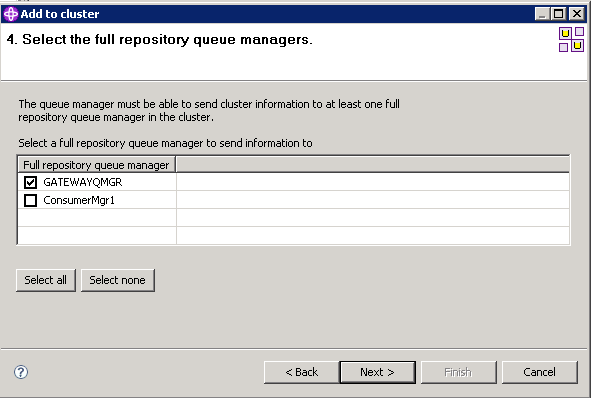
Create cluster queue manager, e.g. CLUSTERMGR. Select GATEWAYQMGR as first full repository and ConsumerMgr1 as second full repository.


Step 4:
Create partial repository. Right-click on cluster manager and add queue manager ConsumerMgr2.


Step 5:
Create local queue to in both ConsumerMgr1 and ConsumerMgr2. 


Step 6:
Create local queue in GATEWAYQMGR with attribute SYSTEM.CLUSTER.TRANSMIT.QUEUE. Message sent to Q.LOC of GATEWAYQMGR will go to either ConsumerMgr1 or 2.


Saturday, November 21, 2015

Clustering/Load balancing using Apache HTTP server

Simple step to cluster Web Service using Apache HTTP server. The HTTP server act as a load balancer for 2 or more resources.


A. Ensure that the following modules are enabled.
  LoadModule actions_module modules/mod_actions.so
  LoadModule alias_module modules/mod_alias.so
  LoadModule allowmethods_module modules/mod_allowmethods.so
  LoadModule asis_module modules/mod_asis.so
  LoadModule auth_basic_module modules/mod_auth_basic.so
  LoadModule authn_core_module modules/mod_authn_core.so
  LoadModule authn_file_module modules/mod_authn_file.so
  LoadModule authz_core_module modules/mod_authz_core.so
  LoadModule authz_groupfile_module modules/mod_authz_groupfile.so
  LoadModule authz_host_module modules/mod_authz_host.so
  LoadModule authz_user_module modules/mod_authz_user.so
  LoadModule autoindex_module modules/mod_autoindex.so
  LoadModule cgi_module modules/mod_cgi.so
  LoadModule dir_module modules/mod_dir.so
  LoadModule env_module modules/mod_env.so
  LoadModule include_module modules/mod_include.so
  LoadModule info_module modules/mod_info.so
  LoadModule isapi_module modules/mod_isapi.so
  LoadModule lbmethod_byrequests_module modules/mod_lbmethod_byrequests.so
  LoadModule log_config_module modules/mod_log_config.so
  LoadModule mime_module modules/mod_mime.so
  LoadModule negotiation_module modules/mod_negotiation.so
  LoadModule proxy_module modules/mod_proxy.so
  LoadModule proxy_balancer_module modules/mod_proxy_balancer.so 
  LoadModule proxy_html_module modules/mod_proxy_html.so
  LoadModule proxy_http_module modules/mod_proxy_http.so
  LoadModule setenvif_module modules/mod_setenvif.so
  LoadModule slotmem_shm_module modules/mod_slotmem_shm.so
  LoadModule socache_shmcb_module modules/mod_socache_shmcb.so
  LoadModule ssl_module modules/mod_ssl.so
  LoadModule status_module modules/mod_status.so
  LoadModule xml2enc_module modules/mod_xml2enc.so


B. Add httpd-proxy-balancer.conf.
  Include conf/extra/httpd-proxy-balancer.conf

C. Create httpd-proxy-balancer.conf inside extra folder.
<VirtualHost *>
    #--- Set to Off since it is not request forwarder.
     ProxyRequests Off
    #--- Display load balance status.
     ProxyStatus On
    #--- Not passing request to proxied host.
     ProxyPreserveHost Off
     ProxyPass /balancer-manager !
     ProxyPass /server-status !
    #-- Balancer cluster name.
     ProxyPass / balancer://mycluster/ STICKYSESSION=mysticky_session nofailover=Off
    #-- Logging.
     CustomLog C:/Apache24/logs/balancer_log.txt combined
    #-- Use as gateway.
     ProxyPassReverse / balancer://mycluster
 
    #-- Cluster / balancer.
     <Proxy balancer://mycluster>
      BalancerMember http://{hostname}:{port} route=first loadfactor=5
      BalancerMember http://{hostname}:{port} route=second loadfactor=5
    </Proxy>
 
    <Location /balancer-manager>
     SetHandler balancer-manager
    </Location>
 
    <Location /server-status>
     SetHandler server-status
    </Location>
</VirtualHost>
D. Start Apache HTTP server.
/bin/httpd.exe
E. Access the application via port 80 if using default port.
http://{host name}:{port}/{app web-context}
F. Status of balancer can be checked from accessing Balance Manager URL.
  http://{hostname}:{port}/balancer-manager

Monday, September 14, 2015

[Java] Stored procedure call for AS400

Sample code to call SQL stored procedure in IBM iDB2 for i.

import java.sql.CallableStatement;
import java.sql.Connection;
import java.sql.DriverManager;
import java.sql.ResultSet;
import java.sql.ResultSetMetaData;
import java.sql.SQLException;
import java.sql.Types;


public class TestProcedureCall{


 public static void main(String[] args) {

  String storedProcedure = "{ CALL MYPROC (?, ?, ?) }";
  byte[] blankByte = " ".getBytes();

  try{
   Class.forName("com.ibm.as400.access.AS400JDBCDriver");
   Connection con = DriverManager.getConnection(
     "jdbc:as400://LOCALHOST", "USER1", "PASSWORD1");
   
   CallableStatement  stmt = 
     con.prepareCall(storedProcedure);

  stmt.setString(1,"ROBIN"); //Name
   stmt.setBytes(2,blankByte); //Nothing
   stmt.setInt(3,30); //Age

  stmt.registerOutParameter(1,Types.CHAR);
   stmt.registerOutParameter(2,Types.CHAR);
   stmt.registerOutParameter(5,Types.DECIMAL);

ResultSet rs = callableStatement.executeQuery();
   ResultSetMetaData rsMetaData = rs.getMetaData();
   int colCount = rsMetaData.getColumnCount();

   for (int i = 1 ; i <= colCount ; i++){
    System.out.println(rsMetaData.getColumnName(i));
  }

   rs.close();
   callableStatement.close();
   con.close();

  } catch (ClassNotFoundException e) {
   e.printStackTrace();
  } catch (SQLException e) {
   e.printStackTrace();
  }

 }//End main

}//End class

Monday, September 7, 2015

[Java] IBM AS400 JDBC Call

Sample AS400 JDBC class.


import java.sql.Connection;
import java.sql.DriverManager;
import java.sql.ResultSet;
import java.sql.SQLException;
import java.sql.Statement;
import java.util.ArrayList;

public class AS400Query {

 public static void main(String[] args) {

ArrayList<String> arl = new ArrayList<String>();

try {
Class.forName("com.ibm.as400.access.AS400JDBCDriver");
Connection con =   
       DriverManager.getConnection("jdbc:as400://<server>", 
       "<user>", "<password>");

Statement stmt = con.createStatement();
ResultSet rs = stmt.executeQuery("SELECT <col> FROM <table>");

while (rs.next()){
arl.add(rs.getString(1));
}

rs.close();

for(String s : arl){
String sql = " UPDATE <table> SET COL= " + s;
System.out.println(sql);
stmt.execute(sql);
}

stmt.close();
con.close();

} catch (ClassNotFoundException e) {
e.printStackTrace();
} catch (SQLException e) {
e.printStackTrace();
}


}


}